
A SkillonX Product · Intelligent programming environment
ScriptOnX
A desktop programming learning environment where learners write and run real programs, and get an explanation when something fails.
The failing line is marked and the traceback is shown.
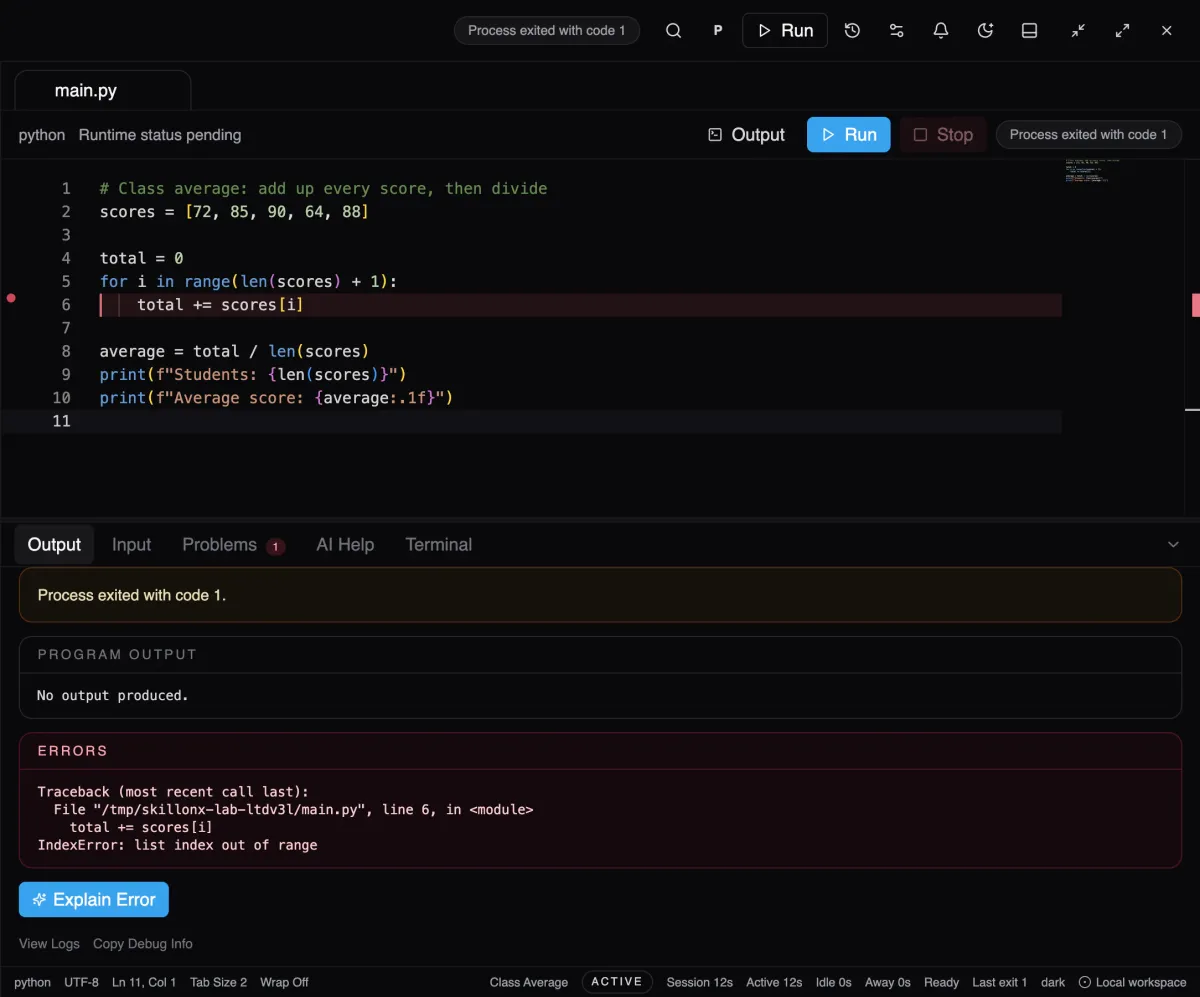
A run fails and the failing line is marked. Official product screenshot with demo data.
The problem
Beginners stuck on an error they cannot read
A beginner who hits a cryptic error often copies a fix without knowing why it works, and in a large class the educator cannot reach every stuck learner at once.
Who it is for
Learners
Write and run real programs, and understand why one failed.
Faculty
Faculty tools and assistance levels are on the roadmap as planned, not available.
PlannedInstitutions
Institution-level features are planned, not available.
Planned
The approach
Run it, understand the error, fix it yourself
Run
Real execution, locally
Programs run on the learner's own computer with their installed compilers and interpreters.
Explain
Explain the error
The failing line is marked and the error is explained in plain language. Common errors use offline rules.
Choose
AI help is optional
AI features need a provider enabled in Settings and the learner's consent. Fix suggestions are shown beside the original code and are never applied automatically.
What it does today
Verified capabilities
ScriptOnX runs code on the learner's own computer and explains errors in plain language, so learners understand why a program failed instead of copying a fix. AI help is optional and needs the learner's consent.
- Real execution
- Runs on the learner's installed compilers and interpreters, showing output, exit codes and errors.
- Explain Error
- Explains what went wrong and why. Common errors use built-in offline rules; AI help requires a provider enabled in Settings and the learner's consent.
- AI Tutor
- Follow-up questions, Explain Code, Dry Run and Fix Error. Fix suggestions appear beside the original code and are not applied until the learner applies them.
- Languages in beta
- Python, C, C++, Java (needs a JDK), JavaScript (Node.js) and SQL (SQLite).
- Database Lab
- SQL practice on local SQLite, with activity reports stored on the learner's computer.
Planned, not available
The ScriptOnX roadmap lists these as planned. They are not part of the closed beta.
- Accounts and sign-in
- Practice library and assignments
- Faculty tools and faculty-set assistance levels
- Progress and mastery tracking, learning analytics
- TypeScript and HTML/CSS
Intended benefits
What ScriptOnX is designed to help with
These describe what the capabilities are built to enable. They are not measured results.
- Help learners understand why a program failed.
- Keep practice running on the learner's own machine.
- Keep the learner in control of when AI is used.
Find your role
How ScriptOnX fits each audience
Current availability
Where ScriptOnX stands today
ScriptOnX is in closed beta, by invitation only, on macOS. Windows is not yet release-certified, and accounts, assignments and faculty tools are planned, not available.
Status read from scriptonx.com on 2026-10-12.
Next step
ScriptOnX is not publicly available. Access is by invitation during the closed beta.